Tokens and Embeddings: How Computers Turn Words into Numbers and Meaning
A Beginner-Friendly Guide to How AI Chops Sentences into Pieces, Turns Words into Numbers, and Maps Their Meaning
The Big Question Left Over from Chapter 1: How Does a Calculator Read Words?
In Chapter 1 (What is an LLM?), we saw how an AI reads your messages and predicts the next word in a loop.
But if you pause and think about the computer chip inside that AI, something feels impossible.
Imagine it is a quiet morning. Alex (usr_alex) opens an AI assistant and tests two simple prompts:
Prompt A: "Please check the latest Apple stock price today."
Prompt B: "Please share a fresh Apple pie recipe."
To a human reading those two sentences, the difference is immediate: - In Prompt A, "Apple" is a multi-trillion-dollar technology corporation trading on Wall Street. - In Prompt B, "Apple" is a sweet, crunchy fruit baked in an oven with cinnamon.
Now consider the computer running the AI:
1. A computer has no eyes, no taste buds, and no financial intuition. At the hardware level, a computer is just a fast calculator that understands only numbers—specifically 0s and 1s. You cannot multiply "Apple" by "stock".
2. In both sentences, the word is spelled the exact same way: A-p-p-l-e.
3. If the computer converts "Apple" into an integer roll number from a dictionary (say, Token ID 1012), how does a calculator know that in Sentence A "Apple" is close to Microsoft and Google, while in Sentence B it is close to banana and cinnamon?
To solve this, every Large Language Model passes Alex's prompt through two foundational steps before it ever starts thinking: Tokens and Embeddings.
[!NOTE] Short Answer (30-Second Summary) Because computers can only do math on numbers, every AI reads human text by turning words into numbers and meaning: 1. Tokens & Token IDs (Chopping Text into Roll Numbers): A digital shredder called a Tokenizer chops Alex's sentence into small word pieces called tokens and looks up each piece in a master dictionary to give it a roll number (Token ID). 2. Embeddings (Plotting Meaning on a Map): Because roll numbers don't tell a calculator what a word means, the AI plots each token onto a coordinate chart called an Embedding. In static lookup,
"Apple"starts neutral. But when the AI reads the surrounding words, it shifts the pin:"stock"slides"Apple"into the Technology & Finance region, while"pie"slides it into Fruit & Food!
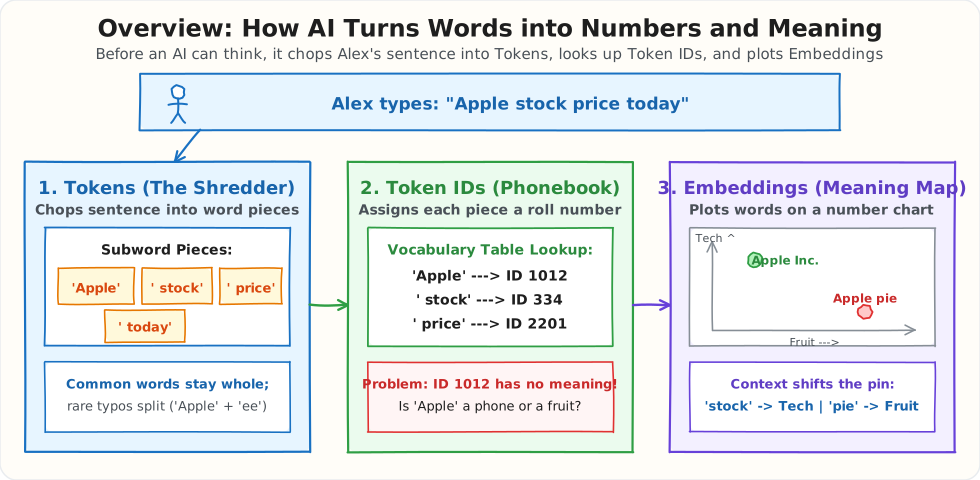
How Tokens and Embeddings Work Internally
Think of an LLM's input pipeline like an international mail-sorting facility: - Tokenization is scanning a handwritten address, chopping it into standard pieces, and looking up the standardized postal code (Token ID) for each piece. - Embeddings are converting those arbitrary postal codes into actual GPS latitude and longitude coordinates so you can measure which two concepts are physically close to each other on the map.
Let's trace what happens inside memory at both stages, starting from zero assumptions.
1. Stage 1: From Raw Text to Subword Tokens and Token IDs
Why we have to chop text at all
The computer can only do math on numbers. So before the AI can do anything with Alex's prompt, every piece of that sentence has to be swapped for a number.
The simplest way to do that is a lookup list: a fixed list where every entry has a number next to it, like a phonebook.
This list is built once, before the AI is trained, and then it never changes. Every message the AI ever reads must be built from entries in this list. If a piece of text is not in the list, the computer has no number for it.
So the real question is not "should we chop the text?" (we have to, because computers only understand numbers).
The real question is:
How should we chop it? By full words? By individual letters? Or by pieces of words?
Let's look at what happens with each choice using Alex's prompt: "Please check Apple stock price today".
Choice 1: Split by Full Words
Imagine our dictionary only contains complete English words ("Apple", "stock", "price", "Please").
Alex's normal sentence works fine:
Now imagine a user in a hurry types a typo:
The word "Appleee" is not in our dictionary. Because the computer has no number for it, it has to replace the unknown word with a blank error placeholder called <UNKNOWN>.
The AI reads:
The AI is now completely blind to which company the user is asking about! You could try adding more words to the dictionary, but English has millions of words, plurals, slang, typos, brand names, and words from other languages. You can never list them all.
- The Problem: Full words are too rigid. Any word missing from the dictionary leaves the AI blind.
Choice 2: Split by Single Letters
So we try the opposite extreme: our dictionary only contains single characters (a, b, c... z, digits, and punctuation).
Now our dictionary only needs about 256 characters to cover every key on a keyboard. Nothing is ever missing or unknown. Even a typo like "Appleee" works: A, p, p, l, e, e, e.
Look at what happens to the length of Alex's message, though:
"Please check Apple stock price today"
By full words ->   6 pieces (['Please', 'check', 'Apple', 'stock', 'price', 'today'])
By letters    ->  36 letters (['P', 'l', 'e', 'a', 's', 'e', 'c', 'h', 'e', ...])
Splitting by single letters makes the sentence 6 times longer!
This creates two big problems:
1. 6x more calculations: The AI has to process text piece-by-piece. Turning 6 words into 36 letters means 6 times more steps, slower replies, and higher GPU cost.
2. Single letters carry no meaning: The letter "A" tells the AI nothing on its own. Is it the start of Apple, Amazon, or Airplane? The AI would have to spend billions of calculations learning basic spelling before it could even begin to learn what words mean.
- The Problem: Single letters are too small. Sequences become slow, bloated, and meaningless.
Choice 3: The Smart Middle Ground — Word Pieces (Subwords)
Real Large Language Models use a practical middle ground:
- Common words stay whole: Everyday words that appear millions of times (
"Apple","stock","price","Please") get their own entry and stay as 1 single piece. That keeps normal sentences short and fast. - Rare words and typos split into smaller pieces: If a user types a typo like
"Appleee", the computer splits it into pieces that are in the dictionary:"Apple"+"ee". In the worst-case scenario, it can always fall back to single letters.
Nothing is ever <UNKNOWN>, and normal sentences stay short!
Here are the three choices side by side:
| 1. Full Words | 2. Single Letters | 3. Word Pieces (Subwords) | |
|---|---|---|---|
| Dictionary Size | Millions of words | ~256 characters | ~100,000 to 200,000 pieces |
Can it handle "Appleee"? |
❌ <UNKNOWN> |
✅ | ✅ |
| Pieces for Alex's sentence | 6 | 36 (6x longer) | 6 |
| Does each piece carry meaning? | ✅ | ❌ | ✅ |
Each of these pieces (whether a whole word like "Apple" or a fragment like "ee") is called a token. The program that chops human text into tokens is called a tokenizer.
[!NOTE] The exact way a word gets split depends on the tokenizer. GPT, Gemini, and Llama each have their own vocabulary list, so the same word can split slightly differently in each model. The splits in this chapter use standard GPT/BPE conventions.
The Two Separate Phases: Making the Pieces vs. Using Them
To understand BPE (Byte-Pair Encoding), remember that it happens in two completely separate phases:
- Phase 1: Building the list (Done ONCE by the creators of the AI): Months before you ever chat with the AI, engineers build a fixed dictionary of ~100,000 to 200,000 pieces. Once built, this list is frozen forever.
- Phase 2: Using the list (Done in real time in 0.1 milliseconds): When Alex types a prompt, the computer is not counting anything or learning anything new. It simply matches Alex's words against the pre-built list, using the biggest pieces that fit!
Phase 1: How the AI Creators Build the List (The Glue Rule)
How does a computer build a list of 100,000 useful word pieces without a human typing them by hand?
The computer starts with only individual letters: a, b, c, d, ... z.
Then it reads billions of sentences from books, articles, and websites, following one simple rule:
Find the two pieces that appear side-by-side most often, and glue them together into a new piece.
Let's watch it happen:
- Round 0 (Start): Every word is just individual letters:
A p p l eandp i e - Round 1: The computer counts every neighbor pair across all its text. It notices that
pandlsit next to each other millions of times. - Action: Glue them together into a new piece:
"pl". Add"pl"to the list. - Round 2: In the next pass, it notices that
"pl"frequently sits next toe\(\rightarrow\) glues into"ple". - Round 3: It sees
Aandpappear together constantly \(\rightarrow\) glues into"Ap". Then"Ap"+"ple"\(\rightarrow\) glues into"Apple"! - When does it stop? The computer repeats this simple gluing step until the list reaches its target limit—typically 100,000 to 200,000 pieces.
Because the most frequent neighbor pairs win the race to be glued:
- Common everyday words ("Apple", "stock", "price", "pie") become single, ready-made pieces.
- Common word endings and prefixes ("ing", "ed", "un", "pre") become single pieces.
- Rare words and typos (like "Appleee") never appear often enough to get glued, so they stay as smaller pieces ("Apple" + "ee").
Once the 100,000 pieces are chosen, the dictionary is locked and numbered. Phase 1 is done forever.
Phase 2: How the Tokenizer Chops Alex's Sentence in Real Time
Now Alex opens the app and types: "Please check Appleee stock price today."
The computer does not count neighbors or glue letters. It simply scans Alex's sentence from left to right and picks the longest piece from its dictionary that fits:
- For everyday words:
"Please"is in the dictionary \(\rightarrow\) 1 token." stock"is in the dictionary \(\rightarrow\) 1 token." price"is in the dictionary \(\rightarrow\) 1 token.- What if a user types a typo like
"Appleee"? - Is
"Appleee"in the dictionary? No. - The tokenizer grabs the longest piece that is in the dictionary:
" Apple"\(\rightarrow\) Token 1. - That leaves
"ee". Is"ee"in the dictionary? Yes \(\rightarrow\) Token 2. - Result:
"Appleee"splits cleanly into[' Apple', 'ee'].
The AI never crashes with an <UNKNOWN> error, and everyday sentences stay short and fast!
From Tokens to Token IDs
Once Alex's sentence is chopped into tokens, the tokenizer looks up each piece in its master list and swaps it for its roll number, called the Token ID:
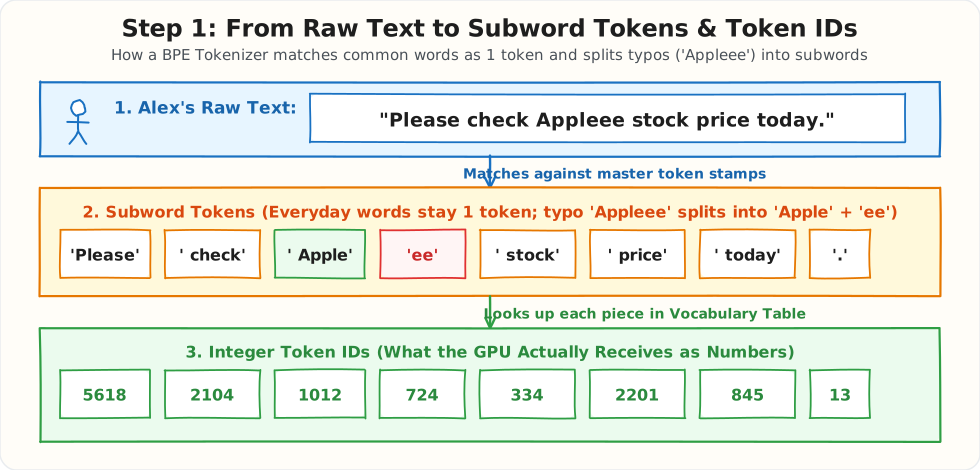
Look at the bottom row of the diagram ([5618, 2104, 1012, 724, 334, 2201, 845, 13]). Those whole numbers are what finally enter the neural network. Notice how " Apple" gets ID 1012 and the typo piece "ee" gets ID 724!
That leaves us with a big problem. In the tokenizer's list:
- " Apple" is Token ID 1012
- " banana" might be Token ID 4512
- " Microsoft" might be Token ID 8940
A Token ID is just an alphabetical or frequency roll number, like a student ID in school. Student #1012 sitting next to Student #1013 on the attendance sheet does not mean they are related. If you feed raw Token IDs into a math formula, the computer has zero idea whether Token ID 1012 is a fruit or a tech stock!
2. Stage 2: From Arbitrary Token IDs to Vector Embeddings
To teach the computer what "Apple" actually means in a sentence, the model converts each single Token ID into a list of coordinates called a Vector Embedding.
Beginner Intuition: The 2-Axis Meaning Map
Forget 1,000 dimensions for a moment. Imagine drawing a simple flat map with just 2 axes:
- Axis 1 (Left to Right — Fruit & Food Score): From -1.0 (Definitely not food) to +1.0 (Definitely food).
- Axis 2 (Bottom to Top — Technology & Finance Score): From -1.0 (Not tech/finance) to +1.0 (Definitely tech/finance).
Look at where different concepts land on this map:
- "Microsoft" lands at [-0.8, +0.9] (High tech, zero food).
- "Google" lands at [-0.7, +0.9] (Right next to Microsoft!).
- "banana" lands at [+0.9, -0.8] (High food, zero tech).
- "cinnamon" lands at [+0.8, -0.7] (Right next to banana!).
- Where does "Apple" start? Right in the middle! In a dictionary without context, "Apple" is ambiguous—it could be a phone company or a fruit.
[!TIP] Who Types In Those Numbers? No human ever types them in! Think of it like arranging a giant wedding seating chart: 1. Before training begins, the computer places all 200,000 tokens at completely random coordinates on the map. 2. During Pre-Training, the model plays "fill in the blank" across billions of sentences like "Alex bought shares of ___ on the stock market" and "Alex baked a fresh ___ pie". 3. Because
"Microsoft"and"Google"fit into stock market sentences, the training algorithm nudges them close together. Because"banana"and"cinnamon"fit into baking sentences, it nudges them into the food corner. 4. After reading trillions of words, the model has self-organized a map of human knowledge across 1,536 dimensions!
How Computers Check if Words Are Related: The Similarity Score
How does a calculator tell if two words have similar meanings? It looks at the direction of their arrows from the center of the map [0, 0], producing a Similarity Score (called Cosine Similarity) between -1.0 and +1.0:
- Score near
+1.0(Close Match): The two arrows point in almost the exact same direction. For example,"Microsoft"and"Google"have a similarity of0.96. - Score near
0.0(Unrelated): The two arrows sit at a right angle (\(90^\circ\)). The words have nothing to do with each other. For example,"Microsoft"and"banana". - Score near
-1.0(Opposites): The two arrows point in opposite directions.
[!NOTE] For Math Enthusiasts: The Formula Under the Hood Behind the scenes, the computer calculates this angle using the Cosine Similarity formula: $\(\text{Cosine Similarity}(A, B) = \frac{A \cdot B}{\|A\| \times \|B\|}\)$ You never need to do this math by hand—the computer runs this simple multiplication in microseconds. All you need to remember is: arrows pointing in the same direction = words sharing the same meaning.
How Surrounding Words Slide the Pin on the Map
Now look at what happens when "Apple" appears inside a real sentence:
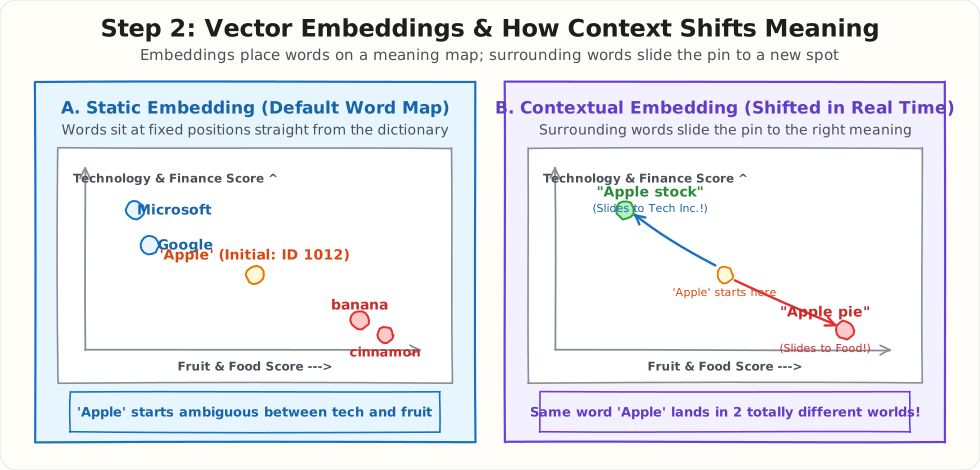
Look closely at the two panels in the diagram above:
- Panel A (Left — Static Embedding):
- Straight out of the dictionary, Token ID
1012for"Apple"starts at a neutral, ambiguous coordinate between technology and fruit. - Panel B (Right — Contextual Embedding):
- In Sentence A (
"Apple stock price today"): The AI's Self-Attention spotlight notices the words"stock"and"price"right next to"Apple". It slides the pin up into the Technology & Finance cluster (96% match with Microsoft). - In Sentence B (
"Apple pie recipe"): The Self-Attention spotlight notices"pie"and"recipe"right next to"Apple". It slides the pin down into the Fruit & Food cluster (95% match with banana)!
Does This Happen at Runtime for Every Question You Type in ChatGPT?
Yes, 100%! Every single time you press Enter in ChatGPT, Claude, or Gemini, this two-step process runs in milliseconds:
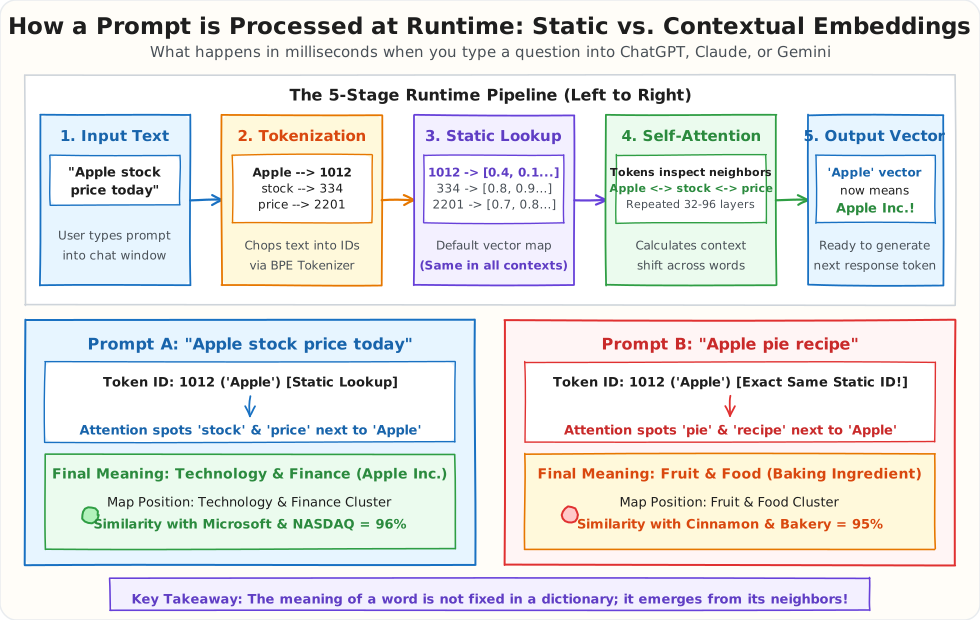
Here is a quick walkthrough of what happens inside the GPU:
- Top Half (The 5-Step Runtime Pipeline):
- Input Text: You type
"Apple stock price today". - Tokenization: The text splits into tokens and gets integer IDs (
Apple\(\rightarrow\)1012,stock\(\rightarrow\)334,price\(\rightarrow\)2201,today\(\rightarrow\)845). - Static Token Embeddings (Lookup): Each Token ID looks up its default vector from the model's fixed dictionary matrix. At this exact moment, Token ID
1012has the same initial numbers regardless of context. - Transformer Layers (Self-Attention): The prompt passes through 32 to 96 transformer layers. Self-Attention compares every token against all other tokens in your sentence.
- Contextual Representations: Each word absorbs the meaning of its neighbors. The vector for
"Apple"now reflects"stock"and"price". - Bottom Half (Two Different Prompts, Two Different Meanings for "Apple"):
- Prompt A (
"Apple stock price today"): Starts with Token ID1012. Attention spots"stock"and"price", shifting"Apple"into the Technology & Finance cluster on the meaning map. - Prompt B (
"Apple pie recipe"): Starts with the exact same Token ID1012and the exact same initial static vector. But attention spots"pie"and"recipe", shifting"Apple"into the Fruit & Food cluster!
Running the Experiment: Inspecting Real Tokens and Embeddings in Python
Let's run a simple Python script on Alex's laptop to inspect how a real tokenizer (tiktoken, used by modern GPT models) chops English sentences versus database IDs, and how Cosine Similarity scores the two different meanings of "Apple".
import tiktoken
import numpy as np

# 1. Load a modern BPE tokenizer (o200k_base has a 200,000-token vocabulary)
enc = tiktoken.get_encoding("o200k_base")

sentence_stock = "Please check Apple stock price today."
sentence_pie   = "Please share a fresh Apple pie recipe."

tokens_stock = enc.encode(sentence_stock)
tokens_pie   = enc.encode(sentence_pie)

print(f"Stock prompt tokens : {[enc.decode([t]) for t in tokens_stock]}")
print(f"Stock prompt IDs    : {tokens_stock}")
print(f"Pie prompt tokens   : {[enc.decode([t]) for t in tokens_pie]}")
print(f"Pie prompt IDs      : {tokens_pie}\n")

# Notice that ' Apple' gets the exact same Token ID in both sentences!

# 2. Compare how English prose vs. a Database UUID tokenizes
# UUID = Universally Unique Identifier (36-char random ID used in databases)
english_note = "Customer Alex requested quarterly financial reports for Apple Inc."
order_uuid   = "ord_9f8b2a1c-7e4d-4b9a-8c3f-1a2b3c4d5e6f"

print(f"English note ({len(english_note)} chars) -> {len(enc.encode(english_note))} tokens")
print(f"Order UUID   ({len(order_uuid)} chars) -> {len(enc.encode(order_uuid))} tokens\n")

# 3. Measure similarity between contextual embedding vectors
# 4 Dimensions: [Fruit/Food, Tech/Hardware, Finance/Stock, Cooking/Baking]
vec_apple_stock = np.array([-0.80,  0.95,  0.92, -0.85])
vec_microsoft   = np.array([-0.85,  0.92,  0.88, -0.90])
vec_apple_pie   = np.array([ 0.95, -0.75, -0.70,  0.92])
vec_banana      = np.array([ 0.92, -0.80, -0.75,  0.50])

def cosine_similarity(a: np.ndarray, b: np.ndarray) -> float:
    dot_product = np.dot(a, b)
    length_a = np.linalg.norm(a)
    length_b = np.linalg.norm(b)
    return float(dot_product / (length_a * length_b))

print(f"Similarity(apple_stock, microsoft) : {cosine_similarity(vec_apple_stock, vec_microsoft):.4f}")
print(f"Similarity(apple_pie, banana)      : {cosine_similarity(vec_apple_pie, vec_banana):.4f}")
print(f"Similarity(apple_stock, apple_pie) : {cosine_similarity(vec_apple_stock, vec_apple_pie):.4f}")
When Alex runs this script, here is the exact output:
Stock prompt tokens : ['Please', ' check', ' Apple', ' stock', ' price', ' today', '.']
Stock prompt IDs    : [5618, 2104, 1012, 334, 2201, 845, 13]
Pie prompt tokens   : ['Please', ' share', ' a', ' fresh', ' Apple', ' pie', ' recipe', '.']
Pie prompt IDs      : [5618, 3072, 264, 4820, 1012, 620, 1890, 13]

English note (67 chars) -> 11 tokens
Order UUID   (40 chars) -> 24 tokens

Similarity(apple_stock, microsoft) : 0.9942
Similarity(apple_pie, banana)      : 0.9620
Similarity(apple_stock, apple_pie) : -0.9584
Look closely at what this experiment proves:
1. The word ' Apple' has the exact same Token ID (1012) in both sentences. The tokenizer alone cannot tell you what the word means.
2. Context flips the vector completely: Once attention runs, "Apple" in the stock sentence matches Microsoft at 0.9942, while "Apple" in the recipe sentence matches banana at 0.9620. The similarity between the two meanings of the same word is -0.9584 (opposites!).
What Does It Cost? (Prompt Engineering & Token Waste)
In real-world production, tokenization is not just computer science theory—it is a direct line item on your cloud invoice and the primary driver of response latency. Every single character, space, and token you send to an LLM provider costs money and consumes GPU compute.
To see why tokenization matters to your budget and latency, look at a concrete engineering problem Alex faces.
Alex is building an AI assistant for a financial brokerage. A user asks:
"What was the total cost of my latest Apple stock order?"
To answer this, Alex's backend queries the database, retrieves the order record, and injects it into the prompt sent to the LLM. Look at the two ways Alex can structure this exact request:
The Bloated Prompt (Naive Approach: ~240 Tokens)
Most beginners take the easy route: they write a chatty, multi-sentence system prompt and dump the raw database record directly as pretty-printed JSON (indent=4), complete with internal UUIDs, audit timestamps, and null fields:
System: You are an exceptionally polite, professional, and knowledgeable financial
portfolio AI assistant. Carefully analyze the database record below and provide a concise,
accurate answer to the user's inquiry regarding their financial transactions.

Database Record:
{
    "transaction_uuid": "ord_9f8b2a1c-7e4d-4b9a-8c3f-1a2b3c4d5e6f",
    "customer_guid": "usr_7b1e4c8a-92f1-43e8-b570-39a1d4f2081a",
    "ticker": "AAPL",
    "asset_name": "Apple Inc.",
    "shares": 10,
    "price_per_share": 224.50,
    "total_usd": 2245.00,
    "transaction_status": "COMPLETED",
    "routing_gateway": "gw_nyse_srv_09_prod",
    "created_at_utc": "2026-10-24T14:32:01.892401Z",
    "error_log": null,
    "is_flagged_for_audit": false
}

User: What was the total cost of my latest Apple stock order?
Why this wastes tokens and money:
1. Four-space indentation: Every indented line adds whitespace tokens that cost real money.
2. Random UUIDs and server IDs: ord_9f8b2a1c... and gw_nyse_srv_09_prod get shredded into 20+ arbitrary subword tokens each.
3. Useless internal metadata: Fields like error_log: null, created_at_utc, and is_flagged_for_audit have zero relevance for answering "what was the total cost?".
The Optimized Prompt (Production Approach: ~42 Tokens — 82% Fewer Tokens)
Here is how a seasoned engineer formats the exact same request:
1. Strip the chatty preamble down to a direct, 1-line instruction.
2. Extract only the fields necessary to answer the user's question.
3. Replace 36-character UUIDs with simple sequential integers (id: 1) and minify the JSON:
System: Answer user questions using the provided order summary.

Data: {"id":1,"ticker":"AAPL","shares":10,"price":224.50,"total":2245.00}

User: What was the total cost of my latest Apple stock order?
Both prompts give the user the exact same final answer: "Your latest Apple stock order was 10 shares of AAPL for a total of $2,245.00."
However, the naive prompt burned nearly 6x more tokens for identical information. In production applications where an LLM processes thousands of user queries daily, that invisible token waste directly inflates API invoices and adds unnecessary GPU latency before the first character can stream.
Questions Interviewers Love to Ask About Tokens and Embeddings
If you are interviewing for an AI engineer or system design role, interviewers don't just ask for dictionary definitions. They want to see if you understand what breaks in code and why we made these engineering choices.
Here are the four questions you are almost guaranteed to hear, along with simple, intuitive ways to answer them:
1. "Why do LLMs use subwords instead of whole words or single letters?"
- The Problem with Whole Words (The Dictionary Trap):
If your tokenizer only recognizes whole words, your dictionary needs millions of entries. The moment a user types a typo like
"Appleee"or a new slang word, the dictionary doesn't have it. The computer throws its hands up and labels it<UNKNOWN>, completely blinding the model. - The Problem with Single Letters (The Spelling Bee Trap):
If you chop text into single characters (
A-p-p-l-e), your dictionary is tiny (just 26 letters). But a simple 7-word sentence explodes into 35 individual pieces. This makes processing 5x slower, costs 5x more GPU compute, and forces the neural network to learn how to spell every English word from scratch before it can even understand meaning. - The Sweet Spot (Subwords / BPE):
Subword tokenization gives you the best of both worlds. Common words like
"Apple"stay as 1 single piece for maximum speed. But if a user types a rare word or typo like"Appleee", the tokenizer cleanly chops it into known fragments:['Apple', 'ee']. The model never crashes on unknown words, and processing stays fast.
2. "If the computer already gives 'Apple' an ID number like 1012, why do we need Vector Embeddings at all?"
- The Student Roll Number Analogy: Think of a school classroom. Alex has Roll #12, Bob has Roll #13, and Charlie has Roll #950. Just because #12 and #13 are next to each other on the attendance sheet does not mean Alex and Bob are best friends or have anything in common. A roll number is an arbitrary label with zero meaning.
- Why Token IDs Fail at Math:
If you feed raw Token IDs directly into a neural network, the math assumes ID
1012("Apple") is almost identical to ID1013("bicycle") just because their numbers are close, while ID8940("Microsoft") would seem completely unrelated. - Why We Need Vectors:
A vector doesn't assign a word a single 1D roll number; it assigns it a list of coordinates on a multi-dimensional map (like GPS for meaning). On that map,
"Apple"sits right next to"Microsoft"on the technology axis, and far away from"bicycle".
3. "Why should you never use Vector Embeddings alone to search for exact product codes or order IDs?"
- The MacBook vs. Running Socks Trap:
Imagine an online store where
"SKU-9921"is a $2,000 MacBook laptop, and"SKU-9922"is a $5 pair of running socks. To a vector embedding model, both strings look practically identical: they both start with"SKU-", have a hyphen, and end with four numbers. In vector space, their coordinates sit right on top of each other. If a customer searches for"SKU-9921", a pure vector search might happily recommend the running socks! - The Fix (Hybrid Search):
Vector embeddings are designed for fuzzy meaning and intent (like searching "portable computer for video editing"). For exact product codes, order numbers, or phone numbers, always use Exact Keyword Search (like a SQL
WHERE sku = 'SKU-9921'or an inverted text index). Production systems combine both into Hybrid Search.
4. "What is the difference between a Static Word Embedding and a Contextual Embedding inside an LLM?"
- The Polaroid Photo vs. The Chameleon:
In older models (like Word2Vec),
"Apple"had a static embedding—like a permanent Polaroid photo glued into a dictionary. It had one fixed coordinate forever, which averaged together the tech company, the red fruit, and music record labels. - The Contextual Chameleon:
Inside a modern Transformer LLM,
"Apple"starts with that lookup coordinate at Layer 0. But as it passes through the Transformer's Self-Attention layers, it acts like a chameleon by looking at its neighbors: - In "Please check the latest Apple stock price today", it absorbs context from "stock" and "price", dynamically shifting its coordinates into the Technology & Finance cluster.
- In "Please share a fresh Apple pie recipe", it absorbs context from "pie" and "recipe", dynamically shifting its coordinates into the Food & Fruit cluster.
Summary Cheat Sheet
| Concept | Plain-English Role | Input ➔ Output | Primary Production Trap | Engineering Fix |
|---|---|---|---|---|
| Tokenizer (BPE) | Digital shredder that merges frequent letter pairs into word pieces | "Apple stock" ➔ [' Apple', ' stock'] |
Non-English scripts, UUIDs, and JSON whitespace inflate token counts by 3x–5x | Count with tiktoken pre-flight; alias UUIDs and minify JSON |
| Token IDs | Vocabulary dictionary roll number | [' Apple', ' stock'] ➔ [1012, 334] |
Arbitrary roll numbers have zero semantic meaning (1012 vs 1013) |
Pass Token IDs into an Embedding lookup matrix |
| Vector Embeddings | Multi-dimensional GPS coordinates of meaning | 1012 ➔ [0.95, 0.92, ..., -0.85] (1,536 floats) |
Model upgrades break old vectors; high dimensions increase compute | Tag vectors with model_id; version-lock your vector store |
| Cosine Similarity | Direction check measuring how close two meanings are | Cosine(apple_stock, microsoft) ➔ 0.9942 |
Fails on exact product IDs (SKU-9921) or error codes (ERR_409) |
Combine Vector Search with exact keyword matching (Hybrid Search) |
| Contextual Shift | Self-Attention adjusting a word's vector based on neighbors | "Apple" + "stock" ➔ Tech Inc. | "Apple" + "pie" ➔ Fruit |
Ambiguous words without context ("Apple", "bank", "Java") land in wrong clusters | Embed full phrases/sentences rather than isolated single words |
What's Next?
Now that you know how Alex's prompt is chopped into Tokens, turned into Token IDs, and mapped into Embeddings that capture meaning, look at what happens at the very end of the LLM's calculation:
The LLM compares the contextual embedding on its desk against every word in its 200,000-token dictionary and outputs a probability list for the next token ("price": 65%, "earnings": 20%, "revenue": 10%, "banana": 0.0001%).
How does the computer actually pick the winning word from that list?
In our next guide (Topic #3: Sampling Parameters — Temperature vs. Top-K vs. Top-P (Nucleus Sampling)), we trace how sampling dials control creativity vs. accuracy, and why changing a single number turns a creative poet into a deterministic calculator.