Designing a Distributed Unique ID Generator: From Database Counters to Twitter Snowflake and UUID v7
How apps like Amazon, Discord, and Uber give every order and message a unique receipt number across thousands of computers without ever picking the same number twice
Problem #1: When One Database becomes Two, Your Order Numbers Collide
Imagine you run a small online store. In the beginning, all your customer orders are saved inside one single PostgreSQL or MySQL database server.
Every time a customer places an order, the database needs to stamp that row with a Primary Key (a unique identification number, such as order_id = 1001, so the system never confuses two different orders). On a single database server, you turn on AUTO_INCREMENT (or SERIAL). The database keeps a simple counter in memory and adds 1 every time a new row arrives: 1000, 1001, 1002. Because every single checkout request goes through that one computer, two orders can never get the same number.
Now fast-forward six months. Your store runs a midnight flash sale, and 50,000 customers click "Buy Now" at the exact same second. One database server cannot handle 50,000 writes per second, so your team sets up two database servers (Database Node A and Database Node B) behind a load balancer to split the traffic.
Look at what happens at 12:00:00.001 the moment both servers start taking orders:
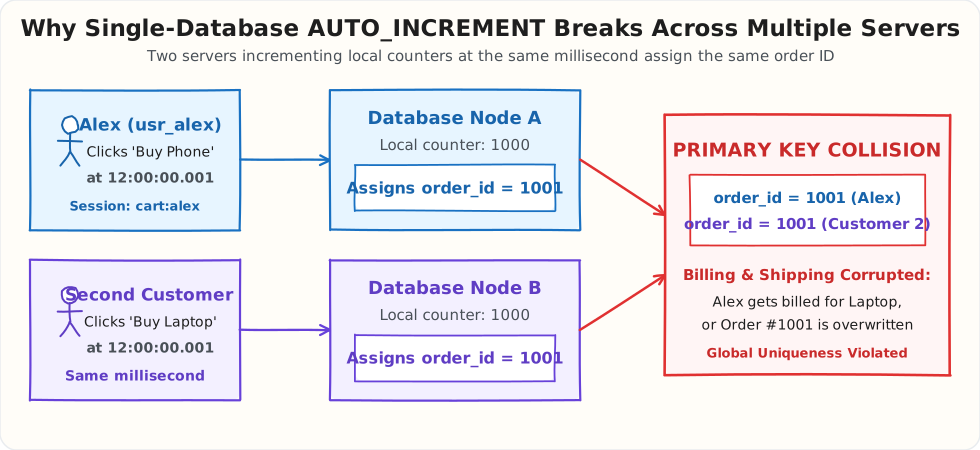
At 12:00:00.001, Alex (usr_alex) clicks "Buy Phone" on his cart (cart:alex), and the load balancer sends his request to Database Node A. Node A looks at its local counter (1000), adds 1, and gives Alex order_id = 1001.
At that exact same millisecond, another customer clicks "Buy Laptop", and the load balancer sends their request to Database Node B. Node B has no idea what Node A just did. It looks at its own local counter (1000), adds 1, and ALSO assigns order_id = 1001.
Two seconds later, your payment and shipping systems pull orders from both databases and crash:
- Overwritten Orders: When both databases sync to your main warehouse table, the second customer's laptop order either overwrites Alex's phone order or crashes the sync job with
ERROR: duplicate key value violates unique constraint "orders_pkey". - Billing & Shipping Mix-ups: If the payment service looks up
order_id = 1001, it cannot tell whether#1001belongs to Alex or the second customer. - Broken Chat & Feed History: If this were a Discord or WhatsApp chat server, two messages with
message_id = 1001would overwrite each other in the chat history.
This is the core real-world problem we have to solve: When you have 10, 100, or 1,000 servers taking requests at the exact same millisecond, how does each server stamp a 100% unique ID without waiting in line at a single slow database?
[!NOTE] Short Answer (30-Second Summary) When your app scales beyond one database server, local
AUTO_INCREMENTcounters collide, central counter databases become a single point of failure, and random 128-bitUUID v4strings slow down database disk writes by up to 8x because they insert into random middle pages of your database index.Real-world companies solve this with Twitter Snowflake (which packs the current millisecond, the server number, and a tiny local counter into a single 64-bit number) or UUID v7 (which puts a 48-bit timestamp at the front of a UUID). Because both formats start with the current timestamp, every server can generate millions of unique IDs per second in memory that naturally sort by time and write cleanly to the end of your database disk.
Problem #2: We Tried Odd/Even Counters and a Central Ticket Server (And Both Broke During a Traffic Spike)
When teams hit the duplicate order_id = 1001 bug in production, they usually try two quick fixes before realizing why big tech companies abandoned them.
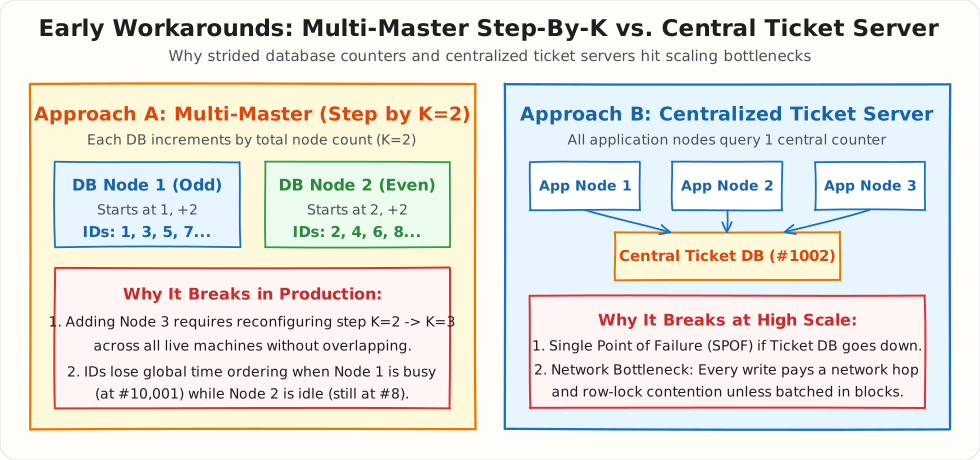
Fix Attempt A: "Let's Make Server 1 Count Odd Numbers, and Server 2 Count Even Numbers"
The easiest database config tweak is Multi-Master AUTO_INCREMENT with a step size of \(K\). Since you have 2 database servers (\(K = 2\)), you configure:
- Database Node 1 to start at
1and add+2every time: it hands out1, 3, 5, 7, 9... - Database Node 2 to start at
2and add+2every time: it hands out2, 4, 6, 8, 10...
Now Node 1 and Node 2 never collide. Problem solved, right?
Until Black Friday arrives. Traffic triples at 11:00 PM, and your team needs to spin up Database Node 3 and Database Node 4 right now to survive the load. Suddenly you are stuck:
- You Cannot Easily Add or Remove Servers: Node 1 and Node 2 are already counting by
+2. To add Node 3 and Node 4, you have to pause writes across your live production databases, find the highest number ever generated, reconfigure every server to step by+4instead of+2, and carefully set new starting offsets so nobody overlaps. - Order Numbers Lose Time Order: Suppose Node 1 gets busy and generates 5,000 odd orders (reaching
order_id = 10001), while Node 2 sits mostly quiet atorder_id = 8. When Alex places an order on Node 2 an hour later, he getsorder_id = 10. If your app sorts Alex's order history or a chat feed byid DESC, Order#10looks like it happened before Order#10001, even though it happened an hour later.
Fix Attempt B: "Let's Put One Central Ticket Server in the Middle"
To avoid the odd/even mess, engineers at Flickr famously built a Centralized Ticket Server. Instead of letting 50 web servers generate their own numbers, every web server makes a quick network call to one dedicated Central Ticket Database whose only job is handing out the next number (1001, 1002, 1003...).
This works until your company hits high scale, where two production problems appear:
- One Crash Takes Down the Whole Company: That central Ticket Server is now a Single Point of Failure (SPOF, a single machine whose crash stops your entire application). If the Ticket Server reboots or loses network connectivity for 30 seconds, none of your 100 checkout servers can get an
order_id, so nobody can buy anything. - Every Write Waits on the Network: Even on a fast datacenter network, asking a central server for a number adds
1 ms to 2 msof network round-trip latency plus database row-lock waiting on every single request.
(Some teams reduce the network calls using Batch Leasing, where each web server asks the central database for a block of 1,000 numbers at once, such as 5,000 to 5,999, and hands them out from local memory. However, every time a container restarts during a deployment after using only 50 numbers, the remaining 950 numbers in that block are thrown away forever, creating large gaps in your IDs).
Problem #3: We Switched to Random UUID v4, and Inserts Slowed Down as the Table Grew
After getting burned by database counters, most teams reach the same conclusion: "Why use numbers at all? Python has uuid.uuid4(), Java has UUID.randomUUID(), and PostgreSQL has gen_random_uuid(). Every server can generate its own ID."
UUID stands for Universally Unique Identifier. Version 4 (UUID v4) is 128 bits (16 bytes) of mostly random data, usually written as a 36-character string:
122 of those bits are random, which gives about \(5.3 \times 10^{36}\) possible values. Each server generates them locally without talking to anyone, and the chance of two servers producing the same value is small enough to ignore. Uniqueness is solved.
Your team switches order_id to UUID v4 and ships it. For the first few months, checkout works exactly as before. Saving a new order takes about 0.3 milliseconds, and nobody notices a difference.
Then the orders table grows past 50 million rows, and checkout starts slowing down during busy hours. Saving a single order now takes 5 to 10 milliseconds instead of 0.3, roughly 20 to 30 times slower. The database dashboard shows something strange too: the database is constantly reading from disk, even though almost all of the traffic is new orders being saved, not old orders being looked up.
Nobody changed the code, the servers, or the traffic. The table simply got bigger. To understand why size matters, you need one fact about how MySQL and PostgreSQL handle a primary key.
How the Primary Key Index Is Stored
When you declare order_id as the primary key, the database builds a B+ Tree index on it: a sorted directory that lets it find any order in a few steps instead of scanning 50 million rows. The index lives on disk in fixed-size pages (16 KB in MySQL InnoDB, 8 KB in PostgreSQL), and the database caches the pages it uses most in RAM. The rule that matters here is simple: keys inside the index must stay in sorted order.
A real page holds hundreds of keys. In the diagram below, each page holds 3 so the effect is easy to see.
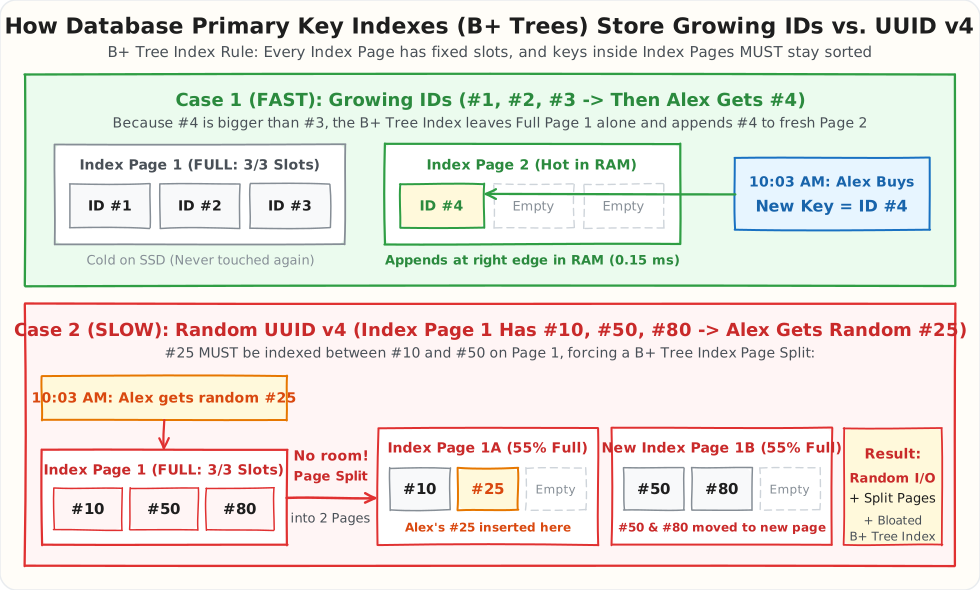
Case 1: IDs That Grow Over Time (Top, Green)
The first three orders get IDs #1, #2, and #3, which fill Index Page 1. At 10:03 AM, Alex places an order and gets #4. Since #4 is larger than every existing key, it belongs at the far right end of the index, so the database starts Index Page 2 and writes #4 there.
Page 1 is never touched again. Every new insert goes to the same rightmost page, which is already in RAM. However large the table grows, the number of pages receiving writes stays at one.
Case 2: Random UUID v4 (Bottom, Red)
Now the first three orders get random values. Picture them as #50, #10, and #80. The index stores them sorted on Page 1 (#10, #50, #80), and the page is full.
At 10:03 AM, Alex gets a random value that sorts like #25. Because the index must stay sorted, #25 has to go between #10 and #50, on Page 1. There is no free slot, so the database performs a page split:
- Load Index Page 1 into memory (from disk, if it is not cached).
- Allocate a new page, Page 1B, and move #50 and #80 into it.
- Insert #25 after #10 on Page 1A.
- Write both pages back. Each one is now partly empty.
Why It Only Hurts at 50 Million Rows
At 1 million rows, the whole primary key index fits in RAM. Random inserts still split pages, but every page they touch is already in memory, so the cost is invisible.
At 50 million rows, the index is much larger than the RAM cache. With random keys, each new order lands on a random page somewhere in the index, and most of those pages are no longer cached. Alex's order hits a page last touched three weeks ago, so the database reads it from SSD before it can insert anything. The next order hits a different cold page. At 10,000 orders per second, that is thousands of random disk reads per second just to insert new rows, plus writes for every page that was modified or split.
Splits also leave pages partly empty. Sequential inserts keep index pages around 90% full, while random inserts settle around 50–70%. The same data now needs more pages, which pushes even more of the index out of RAM. The key itself is larger too: 16 bytes for a binary UUID (36 if stored as text) versus 8 bytes for a BIGINT, and in MySQL every secondary index stores a copy of the primary key.
A random UUID also carries no time information, so ORDER BY order_id no longer means "newest first."
Local generation was the right idea. The ID just needs to grow with time, so that new IDs from every server land at the right edge of the index like Case 1.
How We Solve It: Twitter Snowflake (64-Bit) and Modern UUID v7 (128-Bit)
Now pause and look at what our real-world database actually wants. To make database writes fast and avoid central bottlenecks, we need an ID that:
- Starts with the current timestamp (so every new ID is larger than the previous one, appending cleanly to the end of the database B+ Tree in RAM).
- Can be generated locally by 1,000 servers at the exact same millisecond without ever colliding or making a network call.
- Fits inside a compact 64-bit integer (
8 bytes) so database indexes stay small and fast.
In 2010, engineers at Twitter (now X) solved this exact problem when scaling from MySQL to Cassandra to handle tens of thousands of tweets per second. They created Twitter Snowflake.
1. The Twitter Snowflake Recipe: Packing 4 Pieces into 1 Number
How do you make sure two servers never generate the same number at the same millisecond without talking to each other?
You combine Timestamp + Server ID + Local Counter right inside a single 64-bit binary integer (BIGINT):
- Server #5 at millisecond
120001generates:[Time: 120001] [Server: 05] [Counter: 001]->12000105001 - Server #6 at millisecond
120001generates:[Time: 120001] [Server: 06] [Counter: 001]->12000106001
Even though both servers generated an ID at the exact same millisecond without talking to each other, the numbers are guaranteed to be different because their server numbers (05 vs 06) sit right in the middle of the integer. And any ID created one millisecond later (120002...) is automatically a larger number (12000205001 > 12000106001), so all IDs naturally sort by time.
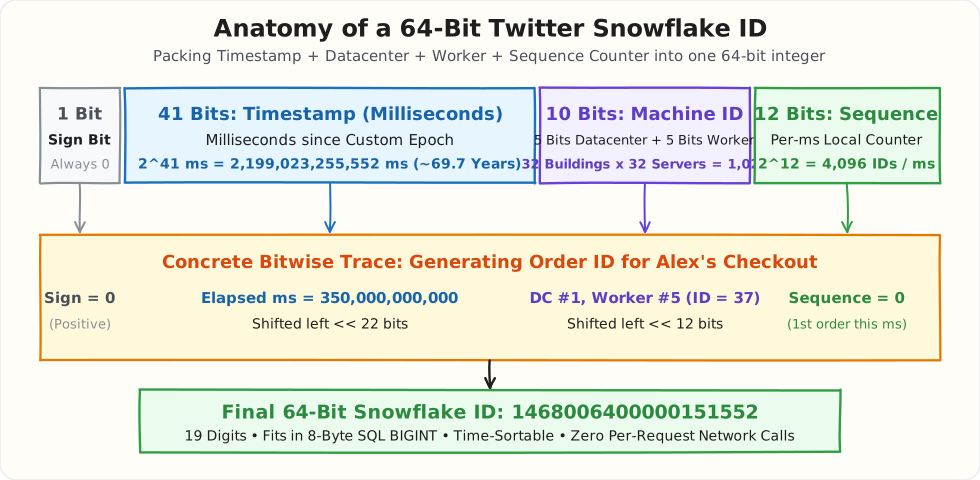
In computer memory, a 64-bit integer is a row of 64 binary switches (0s and 1s). Snowflake divides those 64 bits into four fixed compartments from left to right:
| Compartment | Bits Used | What It Stores | Real-World Capacity & Why It Matters |
|---|---|---|---|
| 1. Sign Bit | 1 bit |
Always 0 |
In programming languages and SQL BIGINT, the first bit says whether a number is positive (0) or negative (1). Keeping it 0 guarantees every ID is a positive number. |
| 2. Timestamp | 41 bits |
Milliseconds since your custom start date (Epoch) | \(2^{41}\) milliseconds = \(2,199,023,255,552\text{ ms} \approx \mathbf{69.7\text{ years}}\). Because the timestamp sits on the far left, newer IDs are always larger numbers, so your database appends them at the end of the B+ Tree with zero page splits. |
| 3. Machine ID | 10 bits |
Which server generated this ID (5 bits Datacenter + 5 bits Worker) |
\(2^{10} = \mathbf{1,024\text{ servers}}\) (32 datacenters x 32 servers). Because every server has its own unique 10-bit badge (0 to 1023), two servers generating an ID at the exact same millisecond will never collide. |
| 4. Sequence Counter | 12 bits |
How many IDs this server generated in this millisecond | \(2^{12} = \mathbf{4,096\text{ IDs per millisecond}}\). If Alex and 500 other users hit Worker #5 during the same 1-millisecond tick, Worker #5 simply counts 0, 1, 2, ..., 4095 in memory and resets to 0 on the next millisecond. |
Wait: What Are "5 Bits Datacenter" and "5 Bits Worker" Inside the 10-Bit Machine ID?
Instead of numbering all 1,024 servers in one giant global list (0 to 1023), Twitter split the 10-bit Machine ID into a two-part address (5 bits + 5 bits), just like a "Building Number + Computer Number":
- First 5 Bits = Datacenter ID (
0to31— "Which Building / City?"): With 5 binary bits (\(2^5 = 32\)), you can label up to 32 physical datacenter buildings (for example:Datacenter #0= Mumbai,Datacenter #1= Virginia,Datacenter #2= Frankfurt). - Next 5 Bits = Worker ID (
0to31— "Which Computer Inside That Building?"): Inside each datacenter building, you have individual server machines (or Kubernetes pods) generating IDs, called Workers. With 5 binary bits (\(2^5 = 32\)), each building can run up to 32 Worker servers (Worker #0toWorker #31). - Why split it 5 + 5? Because then the Mumbai datacenter and the Virginia datacenter never have to coordinate over the internet when starting servers. Mumbai stamps
Datacenter = 0(00000) on its servers, and Virginia stampsDatacenter = 1(00001). Even if both buildings have aWorker #5(00101), their combined 10-bit Machine IDs are completely different (0000000101=5vs0000100101=37).
Look at the throughput math of that design: * In 1 millisecond, one server can generate 4,096 unique IDs (\(2^{12} = 4,096\)). * Since 1 second has 1,000 milliseconds, one single server can generate \(4,096 \times 1,000 = \mathbf{4,096,000\text{ unique IDs per second}}\) completely in local RAM. * Across all 1,024 servers, the cluster can generate over 4 Billion unique IDs per second with zero network calls between servers.
2. How UUID v7 Removes the Need for Machine IDs
Look at the two ideas we have seen so far:
UUID v4([ Random ]): Super easy to use because you never have to assignMachine IDnumbers to your servers. Problem: Because the start of the ID is random, it scrambles your database index and slows down writes.Snowflake([ Timestamp ] + [ Machine ID ] + [ Counter ]): Super fast in the database because it starts with the Timestamp, so every new ID grows bigger over time. Problem: You have to manually assign a uniqueMachine ID(0to1023) to every server so two servers never pick the same number.
What if you have thousands of cloud servers spinning up and shutting down automatically every minute, and you do not want the headache of assigning a unique Machine ID to every server?
In 2024, engineers combined the best part of Snowflake with the best part of UUID v4 to create UUID v7:
UUID v4   (128 bits):  [             122 Bits: Pure Random Numbers             ]
Snowflake (64 bits) :  [ 41 Bits: Timestamp ] + [ 10 Bits: Machine ID + 12 Bits: Counter ]
UUID v7   (128 bits):  [ 48 Bits: Timestamp ] + [ 74 Bits: Random Numbers ]
From Bits to Bytes: How Much Space Each ID Takes
A bit is a single 0 or 1. A byte is a group of 8 bits, and it is the unit databases and disks actually measure storage in. So to get the size of an ID in bytes, divide its bits by 8:
| ID Format | Total Bits | Bits ÷ 8 | Size in Bytes | Written As Text |
|---|---|---|---|---|
Snowflake |
64 bits | 64 ÷ 8 | 8 bytes | 19-digit number (1468006400000151552) |
UUID v7 |
128 bits | 128 ÷ 8 | 16 bytes | 36 characters with hyphens (018f3e9c-8a2b-...) |
UUID v4 |
128 bits | 128 ÷ 8 | 16 bytes | 36 characters with hyphens (f47ac10b-58cc-...) |
You may notice the diagram above does not add up to the totals. 41 + 10 + 12 = 63, not 64, and 122 or 48 + 74 = 122, not 128. The missing bits are small fixed markers:
Snowflakehas 1 extra sign bit at the very front, always0, so the number is always positive (1 + 41 + 10 + 12 = 64).- Both UUIDs reserve 6 bits as labels: 4 version bits (the digit
4or7you see at the start of the third group,-4372-or-7f3a-) and 2 variant bits that mark it as a standard UUID (6 + 122 = 128, and 48 + 4 + 2 + 74 = 128).
What Those Bytes Actually Look Like
Each byte is usually shown as 2 hexadecimal characters (00 to ff), because 2 hex characters hold exactly 8 bits. Here are the IDs from Alex's first order, shown byte by byte the way the database stores them on disk:
Snowflake (8 bytes):
  Number : 1468006400000151552
  Bytes  : [14] [5f] [68] [0b] [00] [02] [50] [00]
            byte 1 ......................... byte 8

UUID v7 (16 bytes):
  Text   : 018f3e9c-8a2b-7f3a-9b12-4c8d1e2f3a4b
  Bytes  : [01] [8f] [3e] [9c] [8a] [2b] | [7f] [3a] [9b] [12] [4c] [8d] [1e] [2f] [3a] [4b]
           |------ 6 bytes = 48 bits ---|  |------------- 10 bytes = 80 bits ------------------|
                  Timestamp (ms)            version "7" + variant + 74 random bits

UUID v4 (16 bytes):
  Text   : f47ac10b-58cc-4372-a567-0e02b2c3d479
  Bytes  : [f4] [7a] [c1] [0b] [58] [cc] [43] [72] [a5] [67] [0e] [02] [b2] [c3] [d4] [79]
           |------------- 16 bytes = 128 bits: version "4" + variant + 122 random bits ------------|
Three things are worth noticing here:
- The
UUID v7timestamp fills exactly the first 6 bytes (48 ÷ 8 = 6). The hex018f3e9c8a2bis the number 1,714,742,397,483, which is the Unix time in milliseconds for 3 May 2024. That is why consecutiveUUID v7IDs share their first bytes and sort in time order. - The
Snowflakefields do not line up with byte boundaries. The 41-bit timestamp ends partway through byte 6, and the 10-bit Machine ID and 12-bit Counter are squeezed into the last bits. The computer doesn't care, since it reads the whole 8 bytes as one number. - The 36-character text form of a UUID is only for humans. The hyphens and hex characters are not stored when you use a binary column (
BINARY(16)in MySQL,uuidin PostgreSQL). If you store it asVARCHAR(36), each character costs 1 byte, so the same ID takes 36 bytes instead of 16.
Instead of putting a Machine ID in the second half of the ID, UUID v7 puts the current millisecond Timestamp in the first half, and fills the second half with Random Numbers:
- First Half =
48-Bit Timestamp(Like Snowflake): Because everyUUID v7starts with the current time (018f3e9c-...), every new ID is bigger than the ones from earlier milliseconds. Your MySQL or PostgreSQL database writes every new row cleanly at the very end of the index with zero page splits. - Second Half =
74 Bits of Random Numbers(LikeUUID v4): Instead of needing aMachine IDto keep two servers from colliding at the same millisecond, each server simply rolls a 74-bit random number for the second half. You never have to configure or trackMachine IDnumbers on your servers. - The Only Trade-Off: Because random numbers need more bits to avoid collisions,
UUID v7is128 bits(16 bytes), which takes twice as much storage space in your database as a64-bit(8-byte) Snowflake ID.
Real-World Example: Comparing 3 Orders Created 1 Millisecond Apart
Suppose Alex places 3 orders in a row at 12:00:00.001, 12:00:00.002, and 12:00:00.003. Look at the actual IDs generated by UUID v4, Snowflake, and UUID v7:
| Order & Time | 1. UUID v4 (128 bits / 16 bytes)Pure Random |
2. Snowflake (64 bits / 8 bytes)Timestamp + Machine ID + Counter |
3. UUID v7 (128 bits / 16 bytes)Timestamp + Random |
|---|---|---|---|
Order #1 at .001 ms |
f47ac10b-58cc-4372-a567-0e02b2c3d479 |
1468006400000151552 |
018f3e9c-8a2b-7f3a-9b12-4c8d1e2f3a4b |
Order #2 at .002 ms |
12c9a841-901a-4b8e-8f11-9a8b7c6d5e4f |
1468006400004345856 |
018f3e9c-8a2c-719d-8a44-1f2e3d4c5b6a |
Order #3 at .003 ms |
9b01e4d2-33f1-4c19-9234-5d6e7f8a9b0c |
1468006400008540160 |
018f3e9c-8a2d-7c01-b231-9e8d7c6b5a4f |
| How the Prefix Changes | Starts with f4, jumps backward to 12, then jumps to 9b (completely random order). |
Prefix grows from 1468006400000... to ...004... to ...008... (strictly increasing). |
First 12 characters grow from 018f3e9c-8a2b to ...8a2c to ...8a2d (strictly increasing), while the rest (-7f3a..., -719d...) is random. |
| Database Impact | Scatters rows across random B+ Tree pages on disk (slow writes at scale). | Appends cleanly at the end of the B+ Tree index and uses half the storage (8 bytes). |
Appends cleanly at the end of the B+ Tree index with zero Machine ID setup needed. |
Three Real-World Production Bugs (And How to Fix Them)
Remember our Snowflake formula: [Timestamp] + [Server ID] + [Counter]. In real production systems, almost every outage comes from one of three simple mistakes: the server clock rewinds, two servers get the same Server ID, or a web browser cuts off the last digits of a 19-digit ID.
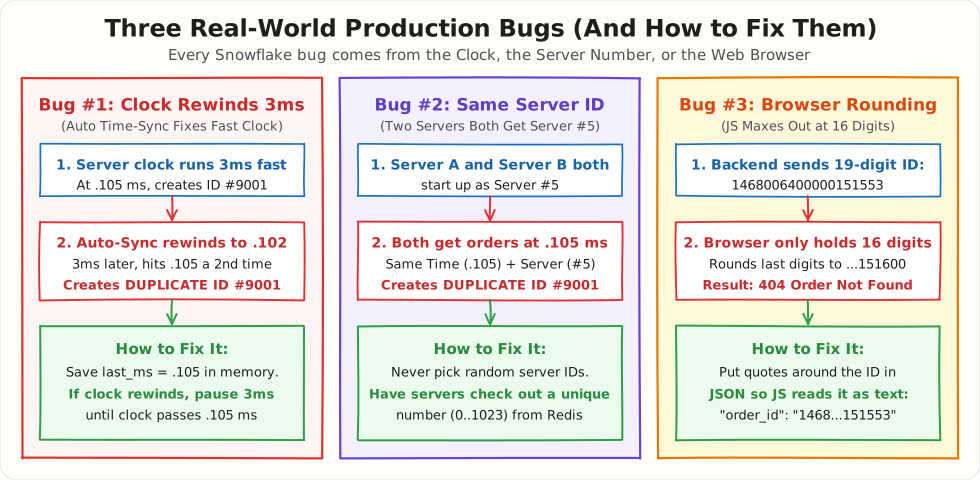
Bug #1: The Server Clock Rewinds by 3 Milliseconds
- Why it happens: Every server has a tiny hardware clock on its motherboard (just like a digital wristwatch). When the server gets hot under heavy load, that clock can tick slightly too fast. Every few minutes, the Linux operating system automatically checks the real time on the internet (using NTP, or Network Time Protocol, which is the server version of "Set Time Automatically" on your phone). If the operating system sees that Server #5's clock is
12:00:00.105when the real world time is only12:00:00.102, the OS automatically rewinds Server #5's clock backward by 3 milliseconds to.102. - What breaks: Right before the rewind, at
.105 ms, Server #5 generated Order ID#9001for Alex. After the OS rewinds the clock to.102 ms, the clock ticks forward for 3 milliseconds and hits.105 msa second time. Because Snowflake builds the ID from the current millisecond, Server #5 accidentally generates Order ID#9001a second time for another shopper, crashing the database with aDuplicate Primary Keyerror. - How to solve it: Save the last millisecond your server used in a variable in memory (
last_ms = .105). Before generating a new ID, check ifcurrent_ms < last_ms. If the clock rewound to.102, simply pause (sleep) for 3 milliseconds until the clock ticks past.105to.106. That way, your server never uses the same millisecond twice.
Bug #2: Two Servers Accidentally Start Up with the Same Server ID
- Why it happens: Snowflake only prevents collisions if every server has a different
Server ID(0to1023). Sometimes developers take a shortcut and writeserver_id = random.randint(0, 1023)in their startup code, hoping two servers will not pick the same random number. - What breaks: Sooner or later, Server A and Server B both boot up and pick
Server ID = 5. The next time Alex and another customer click "Buy" during the exact same millisecond (.105 ms), both servers combine[Time: .105] + [Server: 5] + [Counter: 0]and generate the exact same Order ID, crashing the checkout database. - How to solve it: Never pick random Server IDs. Instead, use one of two simple approaches:
- Keep a checklist in Redis: When a server starts up, it asks Redis for the next unused number between
0and1023and locks that number for itself. - Use Kubernetes numbered servers (
StatefulSet): If you use Kubernetes, deploy your app as aStatefulSet, which automatically names your serversorder-server-0,order-server-1,order-server-2, and use that built-in number at the end of the name as theServer ID.
Bug #3: Web Browsers Silently Change the Last 3 Digits of Your 19-Digit ID
- Why it happens: A 64-bit Snowflake ID is 19 digits long (for example,
1468006400000151553). Your backend database (PostgreSQLorMySQL) and backend code (Python,Go,Java) handle 19-digit numbers easily. However, JavaScript in web browsers (Chrome, Safari, React) can only hold whole numbers up to 16 digits long (9,007,199,254,740,991). - What breaks: If your backend sends Alex's 19-digit order ID to the React frontend as a normal JSON number:
When the browser runs
JSON.parse(), JavaScript cannot fit all 19 digits, so it silently rounds off the last 3 digits and turns1468006400000151553into1468006400000151600without showing any error. When Alex clicks "View My Order", the browser asks your server for order...151600, and Alex gets a404 Order Not Founderror. - How to solve it: Keep storing
order_idas a fast 64-bit number (BIGINT) inside your database, but always put quotes around the ID (String) when sending JSON to a web browser so JavaScript treats it as text instead of rounding it:
[!WARNING] Quick Summary: Which ID Format Suffers From These 3 Bugs? All three bugs happen only in
Snowflake ID(which is another reason many teams preferUUID v7if they can afford the extra 8 bytes of storage):
Bug Affects Snowflake?Affects UUID v7?Affects UUID v4?Simple Fix for Snowflake1. Clock Rewinds ( 3ms)
(Duplicate ID crash)Yes (Counter resets to 0on the repeated.105 ms)No (74 random bits keep the second half unique even if .105 msrepeats)No (Does not use the clock at all) Save last_msin memory. Ifcurrent_ms < last_ms, pause a few milliseconds until the clock passeslast_ms.2. Duplicate Server IDYes (Two Server #5nodes collide at.105 ms)No (Does not use a Server ID)No (Does not use a Server ID)Never pick random Server IDs. Assign unique numbers ( 0..1023) via Redis or KubernetesStatefulSet.3. Browser JS Rounding Yes (19-digit integer exceeds JS 16-digit limit) No (Contains hyphens and letters, so it is already a JSON String) No (Already a JSON String) Put quotes around the ID in JSON ( "order_id": "1468006400000151553") so the browser reads it as text.
How Much Does Your ID Choice Cost in RAM and Dollars?
Remember Problem #3: the database stays fast only while its index fits in RAM. Once the index grows bigger than RAM, every insert has to read pages from disk, and latency jumps from about 0.3 ms to 5–10 ms. So the real question is simple: how big does the index get with each ID format, and how much RAM do you have to pay for to hold it?
Step 1: Why the ID gets stored more than once
Suppose Alex's company runs the orders table on MySQL (InnoDB). The table has the primary key order_id plus 4 extra indexes so the app can search quickly: by user_id (to show "My Orders" for usr_alex), by merchant_id, by order_status, and by created_at.
In MySQL InnoDB, every one of those extra indexes stores a copy of order_id next to its own value, because that is how the database finds the full row afterward. So each order's ID is stored 5 times: once in the primary key index and once in each of the 4 extra indexes. A bigger ID is not paid for once. It is paid for 5 times on every row.
[!NOTE] PostgreSQL works a little differently. Its extra indexes point to the row's physical location (a 6-byte pointer) instead of copying
order_id, so the "5 copies" multiplier mostly applies to MySQL. The page-split problem from random IDs still applies to the PostgreSQL primary key index.
Step 2: The math for 1 billion orders
Here is the space used by the ID part alone, for 1 billion orders stored 5 times:
- Snowflake: 8 bytes × 5 × 1 billion = 40 GB
UUID v7orUUID v4stored as binary: 16 bytes × 5 × 1 billion = 80 GBUUID v4stored as text ("f47ac10b-58cc-..."is 36 characters): 36 bytes × 5 × 1 billion = 180 GB
Then there is a second penalty: empty space inside the index pages.
Recall from Problem #3 that the database stores the index in fixed-size boxes called pages (16 KB each in MySQL). To keep the numbers easy, pretend each page holds only 10 IDs. Watch what happens to the pages as orders come in.
With sorted IDs (Snowflake, UUID v7): every new ID is bigger than all the previous ones, so it always goes into the last page. The database fills page 1 with IDs 1 to 10, then opens page 2 and fills it with 11 to 20, and so on. No page is ever touched again after it fills up, so every page ends up full:
Page 1: [ 1  2  3  4  5  6  7  8  9 10]   10 of 10 slots used
Page 2: [11 12 13 14 15 16 17 18 19 20]   10 of 10 slots used
Page 3: [21 22 23 __ __ __ __ __ __ __]   (still filling, will be full soon)
(In practice MySQL keeps a small gap of about 1/16 free in each page, which is why the real figure is about 95% full rather than 100%.)
With random IDs (UUID v4): a new ID can belong anywhere in the sorted order, often in the middle of a page that is already full. The database has no room to squeeze it in, so it splits that page into two half-full pages and puts the new ID in one of them:
Before: Page 4 is full and a new ID "45" belongs in the middle of it
Page 4: [40 41 42 43 44 46 47 48 49 50]   10 of 10 slots used

After the split: one full page becomes two half-empty pages
Page 4: [40 41 42 43 44 45 __ __ __ __]    6 of 10 slots used
Page 9: [46 47 48 49 50 __ __ __ __ __]    5 of 10 slots used
Those empty slots only get filled if a future random ID happens to land in that exact range. Some pages fill back up, others split again, and across millions of pages the average settles at about 70% full, meaning roughly 3 out of every 10 slots sit empty.
The database cannot hand those empty slots back. A page is always 16 KB in RAM and on disk whether it holds 10 IDs or 5. So to store the same amount of data, random IDs need more pages:
- Sorted IDs at 95% full: 80 GB of IDs ÷ 0.95 ≈ 85 GB of pages.
- Random IDs at 70% full: 80 GB of IDs ÷ 0.70 ≈ 115 GB of pages.
Same 1 billion orders, same 16-byte IDs, but the random version needs about 30 GB more RAM just to hold empty slots:
| ID Format | Raw ID Storage | Page Fullness | Real Index Size | Fits in RAM of | Insert Latency at Peak |
|---|---|---|---|---|---|
| Snowflake (8 bytes) | 40 GB | ~95% (sorted) | ~42 GB | 64 GB server | ~0.3 ms |
UUID v7 binary (16 bytes) |
80 GB | ~95% (sorted) | ~85 GB | 128 GB server | ~0.3 ms |
UUID v4 binary (16 bytes) |
80 GB | ~70% (random) | ~115 GB | 128 GB server (tight) | 5–10 ms |
UUID v4 text (36 bytes) |
180 GB | ~70% (random) | ~257 GB | 512 GB server | 5–10 ms |
Step 3: Turning RAM into a monthly bill
Database servers are priced mostly by RAM. Using rough on-demand AWS RDS prices for memory-optimized instances (prices vary by region and change over time, so treat these as ballpark numbers):
| ID Format | Server Needed | Approx. Monthly Cost |
|---|---|---|
| Snowflake | 64 GB RAM | ~$650 |
UUID v7 |
128 GB RAM | ~$1,300 |
UUID v4 binary |
128 GB RAM (and slow once it grows past it) | ~$1,300 |
UUID v4 text |
512 GB RAM | ~$5,200 |
The difference between the best and worst choice is roughly $4,500 per month for a single database, and most companies run a primary plus 1–2 replicas, which multiplies that number again. The text UUID v4 option is also the slowest, so you pay more and get worse latency.
The practical takeaway: if you use UUIDs at all, store them as 16-byte binary (BINARY(16) in MySQL, uuid type in PostgreSQL), never as 36-character text. Between the good options, UUID v7 costs about twice the index RAM of Snowflake but saves you from managing Server IDs and from Bugs #1 to #3. Snowflake is worth that extra operational work only when you have billions of rows and the RAM savings actually show up on your bill.
Putting It All Together: Complete Production Architecture & Decision Matrix
Now that you have seen how IDs are built, how they fail, and what they cost, how do real companies actually plug an ID generator into their production architecture?
1. Where Does the ID Generator Actually Live?
A common beginner question is: "Should we set up a dedicated ID service that all our backend apps call over HTTP or gRPC?"
In production, the answer is no. If your backend makes an HTTP network call to a separate "ID Server" on every user action, you recreate the ticket-server bottleneck and add 1–2 milliseconds of network latency to every checkout.
Instead, the ID generator is simply a tiny library (SDK) embedded directly inside your application process in memory.
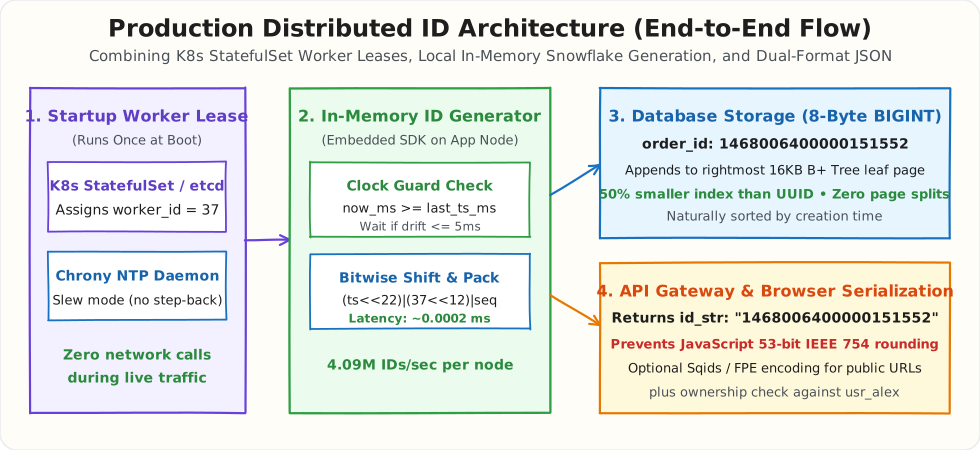
Here is the exact journey of an ID in production, from server boot to Alex's browser:
- At Server Boot (Stage 1: Setup Once):
- When an app container boots up in Kubernetes, it needs a unique number (
0to1023). If you run your application as a KubernetesStatefulSet, Kubernetes names pods sequentially (order-api-0,order-api-1,order-api-2). Pod0takesworker_id = 0, pod1takesworker_id = 1, and so on. No central coordination service is needed during live traffic. - On the host machine, the Linux time-sync service (
chronyd) is configured in slew mode so the server clock never steps backward. - When Alex Clicks Buy (Stage 2: In-Memory Generation):
- Alex clicks "Buy Now" on
cart:alex. - The order API server calls
generator.next_id()right in its own local RAM. - It takes
0.0002 ms(0.2 microseconds) to pack[Timestamp] + [Worker ID] + [Counter]into the 64-bit integer1468006400000151552. Not a single network packet is sent. - Writing to the Database (Stage 3: Fast Append):
- The app writes the order to PostgreSQL or MySQL with
order_id = 1468006400000151552as an 8-byteBIGINT. - Because the ID starts with the current millisecond, it is larger than all previous IDs. The database appends it straight into the rightmost page of the Primary Key B+ Tree in RAM. Zero page splits, zero disk churn.
- Sending JSON to the Frontend (Stage 4: Safe Serialization):
- The API returns the response to the user's browser or mobile app.
- To prevent JavaScript in web browsers from rounding off the 19-digit number, the server returns both formats:
- The React web app reads
order_id_stras text so it never gets corrupted.
2. Decision Matrix: Which ID Generator Should You Pick?
Here is a clear decision guide for choosing the right ID strategy based on your architecture:
| If your system looks like this... | Pick this ID strategy | Why this is the right choice |
|---|---|---|
| Single database (< 10,000 writes/sec) Example: standard monolith, early-stage startup |
Database BIGSERIAL / Identity |
Keep it simple. As long as you have only 1 database server writing rows, standard auto-incrementing integers are fast, compact (8 bytes), and require zero custom code. |
| Serverless / Ephemeral containers Example: AWS Lambda, Cloudflare Workers, Google Cloud Run |
UUID v7 (RFC 9562) |
Serverless functions spin up and disappear in milliseconds. You do not want the operational headache of leasing a 10-bit Worker ID for a function that lives for 200ms. UUID v7 gives you time-sorted database performance without any server ID tracking. |
| High-volume distributed systems Example: e-commerce orders, chat messages, financial ledgers |
64-Bit Snowflake | At billions of rows, Snowflake cuts index RAM in half compared to UUIDs (8 bytes vs 16 bytes). Each app server generates up to 4.09 million IDs per second completely in memory. |
| Security-sensitive secrets Example: password reset tokens, API keys, private invite URLs |
UUID v4 or Cryptographic Random Tokens |
Never use Snowflake or UUID v7 for secrets. Because both formats start with the current timestamp, anyone can estimate when a token was generated and narrow down the search space. Security tokens must be 100% random. |
Interview Questions & Curveballs
1. How should I walk through "Design a Unique ID Generator" in a 45-minute System Design interview?
Start by asking four clarifying questions in the first 2 minutes: Do the IDs need to be time-sortable? Do they need to fit in a 64-bit integer (8 bytes)? What is our target write scale (e.g., 100,000 IDs/sec)? Can we tolerate any network hop per ID? Next, spend 5 minutes explaining why the three naive options fail in production: Multi-Master AUTO_INCREMENT (Step by K) cannot scale elastically when adding servers and loses global time order; a Central Ticket Server becomes a network bottleneck and Single Point of Failure; and 128-bit random UUID v4 causes B+ Tree middle-page splits on SSD. Then spend 20 minutes drawing the 64-bit Snowflake layout (1b sign + 41b timestamp + 10b machine + 12b sequence), showing the capacity math (69.7 years, 1,024 servers, 4,096 IDs/ms), and writing the bitwise formula (elapsed_ms << 22) | (worker_id << 12) | seq. Use the final 10 minutes to discuss the three production traps: NTP clock rollbacks, JavaScript's 53-bit JSON.parse() bug, and UUID v7 for serverless apps.
2. What happens if one server gets hit with 5,000 requests in 1 millisecond (exceeding the 4,096 sequence limit)?
Inside a single millisecond, the 12-bit sequence counter counts from 0 to 4095 (4,096 IDs). On the 4,097th request within that same millisecond, (self.sequence + 1) & 4095 wraps back around to 0. As shown in our Python code, when self.sequence == 0 inside the same-millisecond check, the thread calls _wait_until_next_ms(), sleeping for a fraction of a millisecond (e.g., 0.2 ms) until the clock ticks to the next millisecond, and then continues cleanly. If a single machine regularly receives more than 4,096 requests per millisecond, you can shift 2 bits from the Machine ID compartment to the Sequence compartment (8-bit Machine ID = 256 servers and 14-bit Sequence = 16,384 IDs/ms).
3. If Server A and Server B have clocks that are 2 milliseconds apart, are Snowflake IDs still strictly ordered?
Snowflake IDs are strictly ordered on the same server and roughly ordered (\(k\)-sorted within a few milliseconds) across different servers. Because Server A and Server B sync their clocks over the network via NTP, Server A's clock might read 1002 ms while Server B's clock reads 1000 ms. For 99.9% of applications (sorting chat messages, user orders, or keeping B+ Tree database pages hot in RAM), a 2-millisecond difference between two servers is completely invisible. If a financial or database replication engine requires strict causal ordering across servers without trusting wall clocks, it pairs IDs with Vector Clocks (which we covered in Chapter 2).
4. Why does UUID v7 fix the database slowness of UUID v4 if both are 128-bit UUIDs?
A database B+ Tree sorts keys from left to right. In UUID v4, the leftmost characters are completely random (f47ac10b..., then 12a9c04d..., then 99b1e82a...), which forces the database to jump randomly across old 16 KB pages on the SSD and split full pages in half. In UUID v7, the leftmost 48 bits are the current millisecond timestamp (018f3e9c...), and only the right half is random. Because time always moves forward, every new UUID v7 starts with a prefix that is larger than all previous milliseconds, so every insert lands cleanly on the very last page of the B+ Tree in RAM.
Summary Cheat Sheet
| Concept / Component | How It Works | Real-World Problem It Solves | Common Production Mistake to Avoid |
|---|---|---|---|
Single-DB AUTO_INCREMENT |
Single database adds +1 (1000, 1001, 1002) |
Simple sequential IDs on 1 server | Collides immediately when you split writes across 2+ database servers |
Random UUID v4 (128-bit) |
122 random bits generated locally on each server | Zero coordination needed across servers | Random keys insert into the middle of B+ Tree disk pages, causing slow Page Splits and 2x larger indexes |
Snowflake 41-Bit Timestamp |
Milliseconds since your custom Epoch (\(2^{41}\text{ ms} \approx 69.7\text{ yrs}\)) | Keeps all new IDs sorted by time so DB writes append to the last page in RAM | Using 1970 Unix epoch directly instead of subtracting a recent custom epoch wastes 50+ years of bits |
Snowflake 10-Bit Machine ID |
Unique badge (0..1023) for each server (5b DC + 5b Worker) |
Guarantees two servers never pick the same ID at the exact same millisecond | Picking worker_id randomly on boot instead of using Kubernetes StatefulSet or an etcd lease |
Snowflake 12-Bit Sequence |
Local counter (0..4095) within 1 millisecond |
Lets 1 server generate 4,096 IDs/ms (4.09M IDs/sec) in memory | Forgetting to wait for the next millisecond when the counter wraps past 4095 |
| NTP Clock Skew Guard | Checks if now_ms < last_timestamp_ms |
Prevents duplicate IDs when NTP steps a fast server clock backward by a few ms | Resetting sequence = 0 when time jumps backward instead of waiting for the clock to catch up |
JS 53-Bit Safe String (id_str) |
Sends "order_id_str": "1468006400000151553" in JSON |
Prevents Chrome/Safari JSON.parse() from rounding 64-bit numbers \(> 2^{53}-1\) |
Sending only a raw 64-bit number to a React/JS frontend, causing silent rounding and 404 errors |
UUID v7 (RFC 9562) |
48-bit timestamp prefix + 74 bits random (128-bit total) |
Fast B+ Tree time-sorted inserts with zero Worker ID setup for serverless apps | Using UUID v7 or Snowflake as a secret password-reset token (timestamps are predictable) |